
Library Searching in MSWS
What is Library Searching?
Library searching is used to establish the identity of a peak in a chromatogram. It is an extremely useful tool used to determine which chemical compound the chromatographic peak relates to in your analysis, this is possible due to the mass spectra collected by the mass spectrometer (MS). The mass spectra of the unknown compound can be compared to reference mass spectra in database called a “mass spectral library” to aid in determining its identity.
When an unknown spectra is compared to a reference spectra in a library search it is unlikely to find an identical match due to many factors which come into play during day to day analysis. These factors include the instrument used, the sample analyzed and the parameters used during the analysis.
The library search will result in a match result between 0-1000. Anything above 900 is deemed to be an excellent match result with 999 being a perfect match. See our technical note on the NIST library compound scoring GC-MS in the SCION Knowledge Centre.
Library searching is a powerful tool to identify unknown compounds but it must be noted that using an analytical standard is the only true way to be certain of analyte confirmation. See our technical note on the importance of using analytical standards.
Why is Library Searching Important?
Library searching is important as it allows an analyst to quickly find a likely match for their unknown compound. Mass spectroscopy is sited in many methods published by regulatory bodies such as the US Environmental Protection Agency (EPA) as the means of analyte confirmation.
Library Searching in MSWS
In the SCION Instrument MS software: MS Workstation (MSWS), there are a few options when it comes to library searching. These functions include: manual peak searching, automatic peak searching and a target list search. The different functions available in MSWS allow MS data to be easily processed to determine unknown compounds and quickly identify target analytes. Your MSWS software purchase includes a condensed demo version of the NIST library, any additional libraries must be purchased separately (such as full NIST, Wiley, FFNSC).
Manual Peak Searching
It is likely that a user already has an idea of the contents of their particular sample when choosing to conduct a manual peak search. This function tends to be utilized when a user wishes to focus on a specific region within the total ion chromatogram (TIC) as a result of their analysis. To perform a manual peak search a user simply zooms in on a specific target area and selects the peak of interest which will then display the resulting mass spectra (Figure 1).
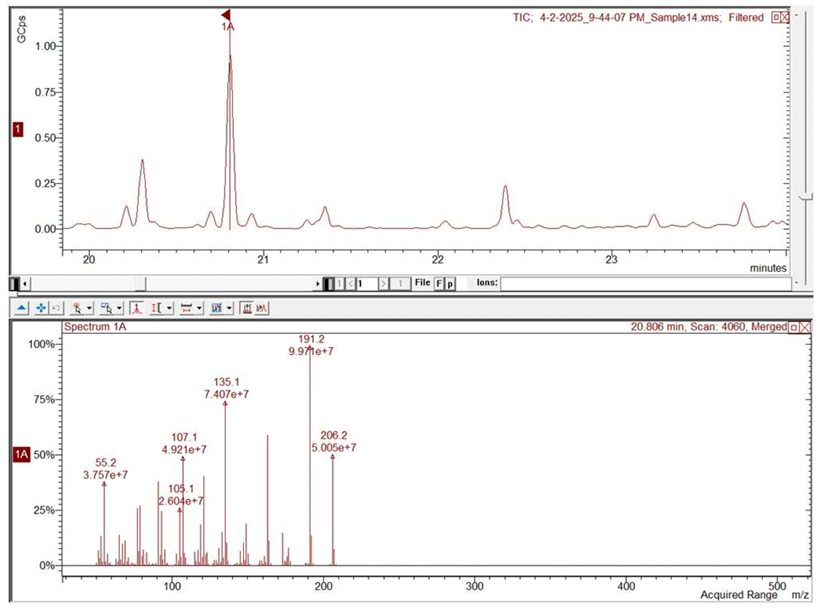 Figure 1 Enhanced TIC of Sample 14 (top) with resulting mass spectra from selected peak @20.81 min (bottom)
The user can perform individual library searches on the desired peaks and compare them with the mass spectral libraires they have within MSWS by using the integrated search function tool to determine the likely identity of the compound.
In Figure 2, the library matches for the peak at 20.81 minutes in the TIC can be seen. The top match is Cashmeran, which when compared with the mass spectra from the unknown compound (red) to the library mass spectra (green), can be deemed to be the most likely identity of the unknown.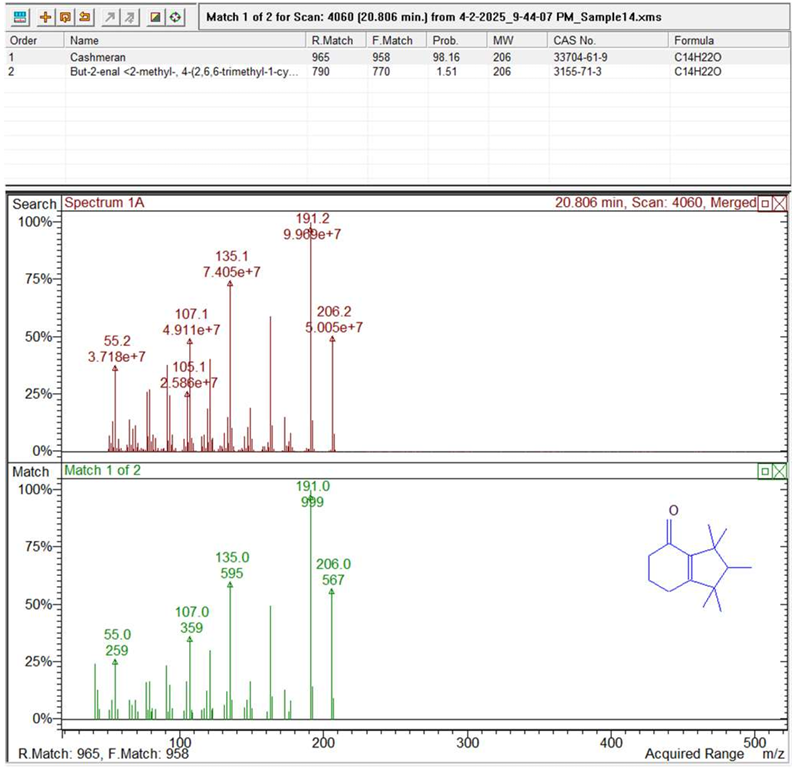 Figure 2 Library search results for unknown peak @20.81 min
Automatic Peak Searching
To conduct an automatic peak search a user can utilize the “integrate” function within the TIC window in MSWS. This function allows integration of multiple peaks based on the conditions set by the user e.g. peak width, sensitivity, minimum peak size, etc (Figures 3 and 4). This is typically done with unknown samples and when the analyst wants to build a picture of the nature of the compounds present within a sample. This is commonly known as profiling.
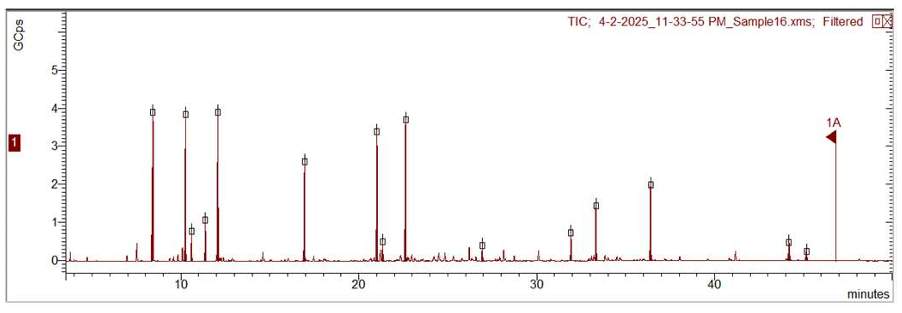 Figure 3 Integrated TIC of Sample 16 showing integrated peaks
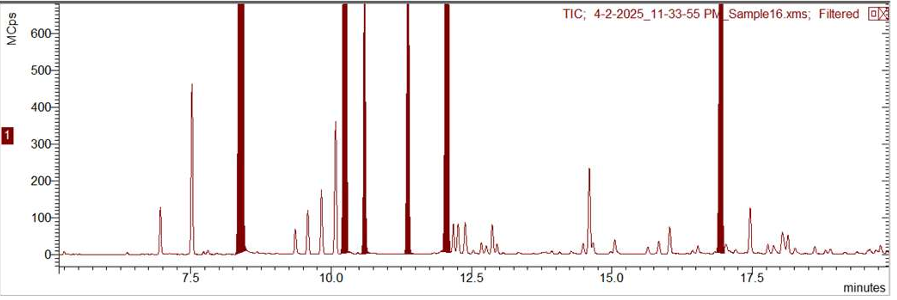 Figure 4 Expanded TIC showing integrated peaks of Sample 16
The user has the ability to then export the mass spectra of all integrated peaks to a spectrum list. The spectrum list can then be used to do a library search of all compounds instantly. An advanced user can utilize this tool fully by adjusting the search parameters to their needs e.g. mass range, number of hits and threshold of matches.
MSWS will then generate the library matches for all integrated peaks and the user can assess them and investigate other matches if there is believed to be a mismatch (Figure 5). These results can be used for qualitative reports or to update the original full scan method or to create a new SIM method for further analysis.
It must be noted that library searching is only applicable to data as a result of a full scan method and not suited to SIM methods.
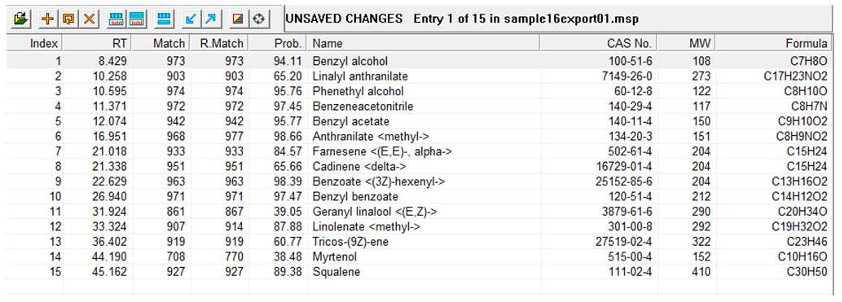 Figure 5 Library matches for the spectrum list (15 compounds) exported from Sample 16
Target List Search
Another function available within MSWS is a target list search. The “Target List Search” tool allows for screening of chromatograms for a specific list of compounds easily. The user has the ability to build a spectrum list of their target compounds from the libraries they have access to including custom libraries they have built from their own data.
From this spectrum list, the target list search function can process the chromatogram and generate a report which shows if any matches for the target compounds have been found. Again, this tool allows the user to customize the search parameters for variables and to be able to limit mass range, response and match threshold searched for.
As an example, see the results from a chromatogram which was scanned using a spectrum list containing 5 compounds from the FFNSC mass spectral library which is used in the fragrances industry for screening and profiling (Figure 6).
This example shows how after searching the chromatogram for the compounds outlined in the spectrum list, a match report is produced as well as a visualisation on the processed chromatogram of the positive matches found, in this case 3 were identified.
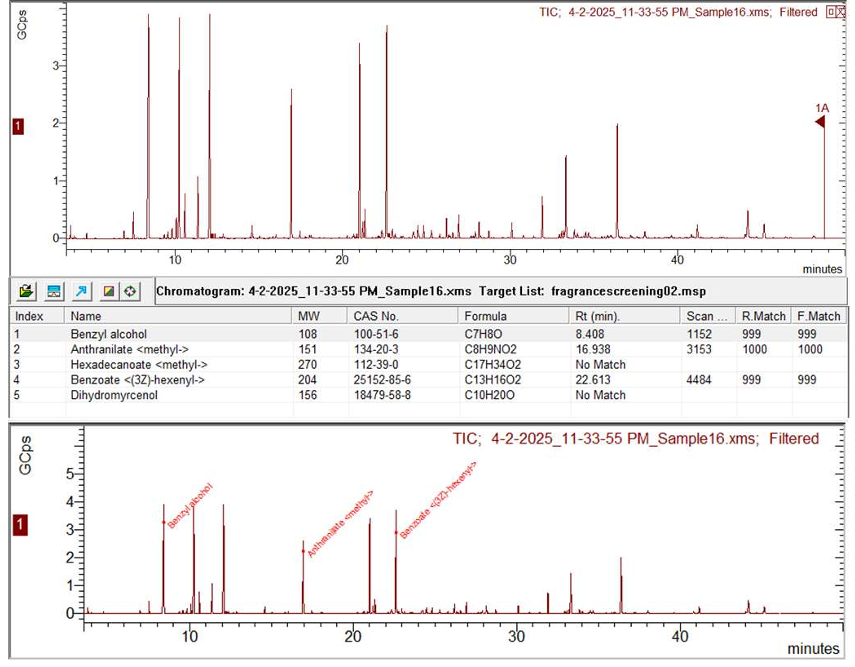 Figure 6 Showing Sample 16 unprocessed TIC (top), target list search result table (middle) and processed TIC with compound match (bottom)
This efficient and extremely useful technique can be used by even novice users for screening of complex data for target compounds with ease.
Once the compounds have been identified the user has the option to produce qualitative reports, process the data further or create a SIM method for subsequent samples to be analyzed.